Project description
In this graded project, you will learn how to program a Crazyflie to fly through course of gates as fast as possible. In the first four weeks, all students have to individually perform a simulation task using the Webots simulator. In the remaining weeks of the course, all students will then compete as groups to compete for the fastes time on a real drone.
Simulation Task overview (individual work)
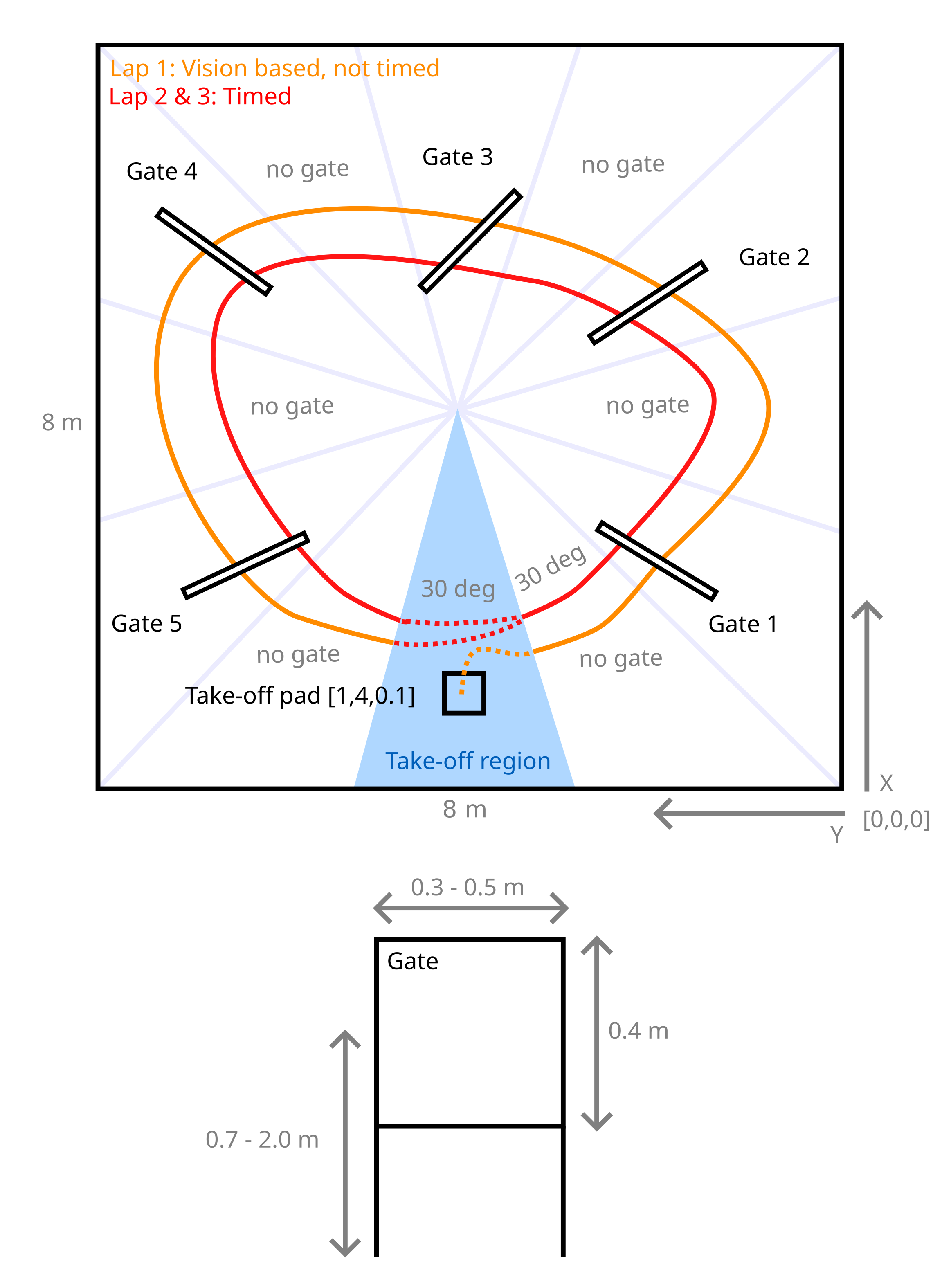
The simulation arena is shown in the figure above. Your task is composed of multiple phases:
The drone takes off from a take-off pad.
In the first lap, the gate positions are unknown and have to be detected using computer vision methods (you may refer to OpenCV packages).
In the second and third lap, you now know the gate positions and the drone has to fly through them as fast as possible.
Please note the following:
The position of the take-off pad is fixed.
The gate positions and sizes are randomly assigned. However, there will always be five gates arranged in a circle-like fashion which must be completed in counter clock-wise order. The gates are always squared.
The clock starts when you leave the take-off region and stops when you enter it again.
The origin and the coordinate system for your reference are indicated in the figure above. The Z coordinate is directed upwards (out of the page).
A maximum time limit for your run in simulation is set at 240 seconds in real-time speed. Only the phases which you have completed up to this cutoff time will determine your grade for this task according to the metrics defined below.
You may use the provided example function libarires under the lib subfolder and the code from previous exercises to assist your implementation. You may also adapt and tune the PID controller within the function setpoint_to_pwm under ex1_pid_control.py.
Grading will be done by evaluating your code on three random environments (but equal for all students) and according to the time you get when running the simulation in real-time.
Here is an example:

Your grade in this simulation exercise will be determined according to the following Performance metrics:
Grade 3.5: Take off
Grade 3.5 - 4.75: For each gate passed through in the first lap you get + 0.25
Grade 4.75 - 6.0:
Grades in this range are determined by a ranking based on the following criteria, in order of priority:
Number of gates correctly detected and passed during the first lap
Total number of gates passed across all three laps
Average completion time of the second and third laps, compared to the rest of the class
Solutions that go against the spirit of the exercise will not be accepted (e.g. finding bugs and exploiting them).
Hardware Task overview (group work)
In the hardware task, you will later work towards transferring your algorithms from simulation onto the real Crazyflie hardware. This time you work in a team of 4-5 people.
The hardware arena is similar in structure to the simulation arena but smaller.
Your grade in this hardware exercise will be determined according to the same Performance metrics as in simulation. You will have three trials, the best one counts.
Hardware grading follows the same structure as the simulation task. Each trial starts from a grade of 3.5 after take-off. During the first lap, teams must detect the gates using vision; each gate that is both correctly detected and flown through adds 0.25 points. After this vision-based lap, the exact gate positions will be provided. The remaining score is then determined by the number of gates completed and the completion time of the second and third laps, as in the simulation task.
Final project grade
The final project grade is composed of the following weighted average of both your grades in the simulation and hardware tasks:
Final_grade = 0.5 * Simulation_grade + 0.5 * Hardware_grade
System scheme
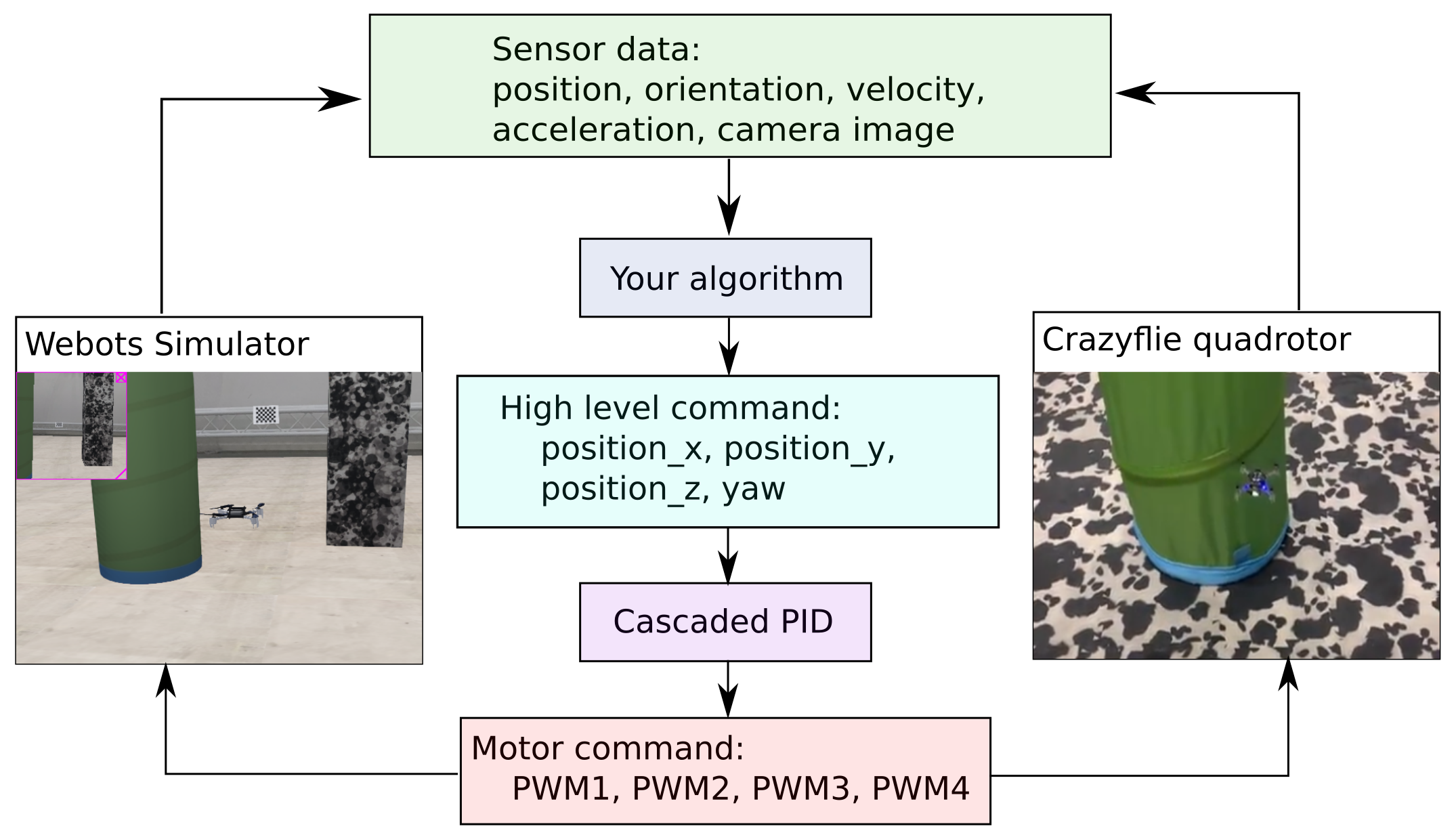
The data flow diagram for both the simulation and the real quadrotor is shown below. Though they have the same types of sensory inputs and control outputs, your algorithm in simulation should be tuned in the real world in order to control the real drone.
Project schedule
The following table provides the schedule of the crazy-practical project.
Week |
Notes |
Week 6, March 25
|
Project introduction, Simulation development, Q&A
|
Week 7, April 1
|
Simulation development, Q&A
|
Week 8, April 8
|
Simulation development, Q&A
|
Week 9, April 15
|
Simulation development, Q&A
Simulation due 23:59 April 28, submit code in Moodle
Select the hardware group in Moodle
|
Week 10, April 29
|
Hardware introduction, pick up your drone by group
|
Week 11, May 6
|
Hardware development, Q&A
|
Week 12, May 13
|
Hardware development, Q&A
|
Week 13, May 20
|
Hardware development, Q&A
|
Week 14, May 26/27
|
Submit hardware task video, Code and Presentation files (due May 26th 23:59)
Hardware task presentation and final demonstrations, hand in the drones (May 27th)
|
Any questions about the task, submission, schedule and grading, please contact Charbel Toumieh (charbel.toumieh@epfl.ch).